Creating collections
8th August 2024
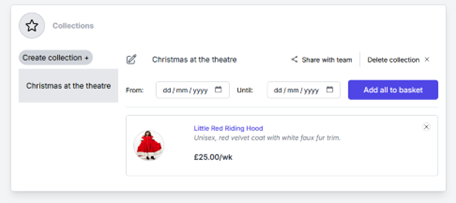
Select the collection that you want to manage from the list on the left of the screen.
NB: On mobile, it will appear as a drop down.
Updating the collection name
- You can update the collection name simply by clicking on it and overwriting. When you click out of the edit box, the collection name will update.
Deleting a collection
- Select the collection you want to delete and click on the "Delete collection" on the top right.
Sharing a collection
- You can share you collection with colleagues by clicking the "Share with team" button.
- All users will be able to add items to the collection, remove items from the collection, or update and delete it.
- Only you will be able to un-share it by clicking the "Make personal" button.
Curating your collection
- You can add new items to the collection from the catalogue. When you find an item that you want for your next show, click on the "Add to collection" field which will display all of your available collections.
- You can remove items from your collection by viewing the collection and clicking the X button on the list item.
Take your collection to checkout
When you are ready to take your collection to checkout:
- Select your collection
- Add the dates for the period that you want to hire the items.
- Click the Add all to basket button.
Any items that are unavailable during the hire period will be highlighted at the checkout. They will need to be removed before proceeding with payment.